How to Edit Your Campaign on Aseel Campaign+: A Complete Guide for Organizers

Nov 22, 2026
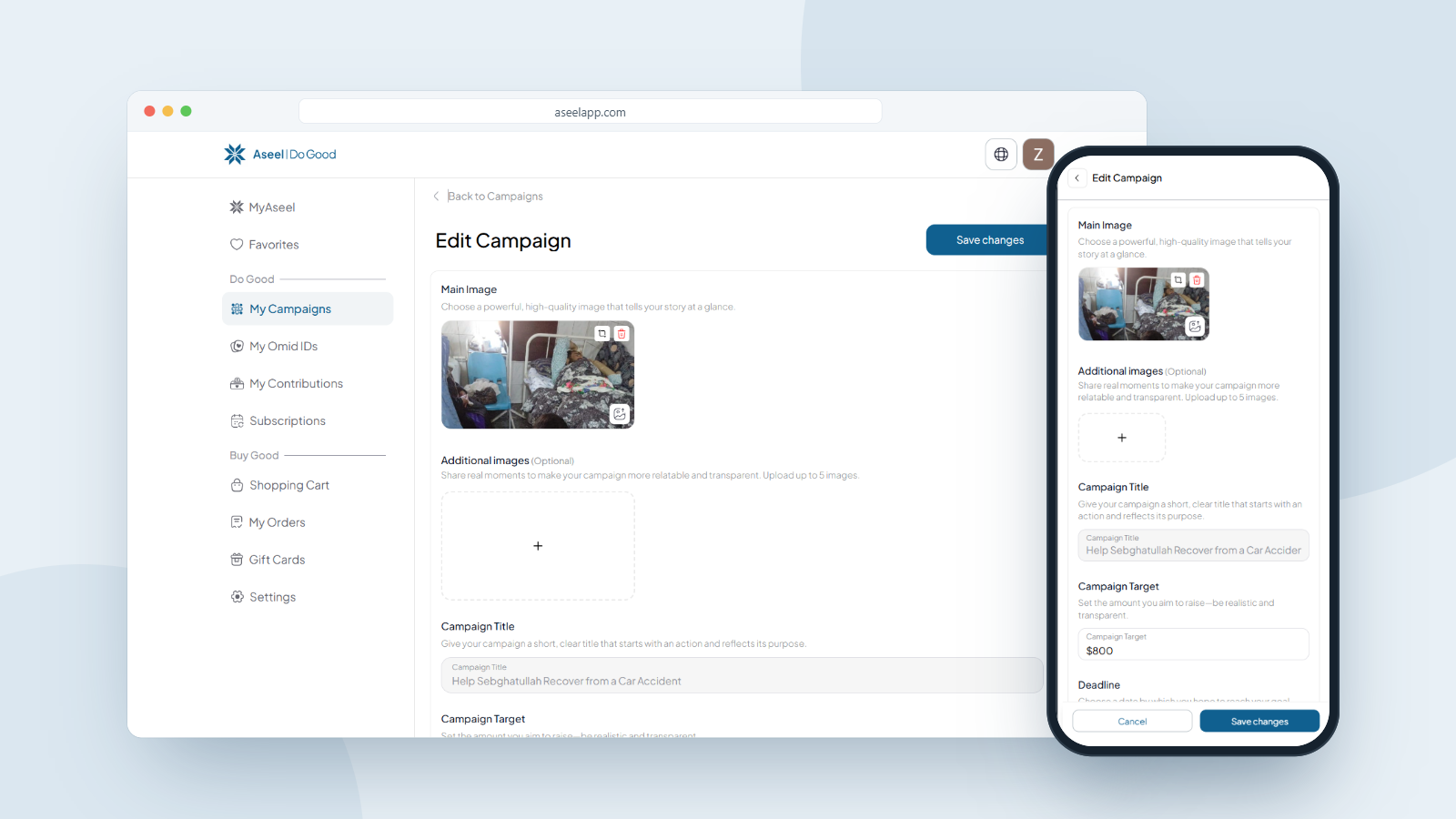
To edit your campaign on Aseel, open your Campaign+ and go to Edit Campaign. You can change most details instantly, your fundraising target, deadline and photos save right away. Three donor-facing fields, your title, description and category, are locked to protect donor trust, so changing them sends a quick edit request to the Aseel team for review. Once approved, the new version goes live and you're notified. Editing your campaign doesn't interrupt your fundraising.
| Edit type | Fields | What happens |
|---|---|---|
| Instant edits | Fundraising target, deadline, photos and videos | Save immediately. Your live campaign updates right away. |
| Reviewed edits | Title, description, category | Locked by default. You submit an edit request, the Aseel team reviews it, and it goes live once approved. You can send a total of 3 edit requests. |
Why are title, description and category reviewed?
These three are the heart of what a donor sees and trusts. If they could change silently after people had already donated, a campaign could promise one thing and become another. The review step protects your donors, and your credibility as an organizer, by making sure the public-facing story stays honest. Everything else is yours to adjust whenever you like.
How to Open Your Edit Campaign Screen
Before the steps, here's exactly where to go. You need to be signed in to the account that created the campaign.
On desktop or laptop:
1. Sign in at aseelapp.com/sign-in and go to your dashboard.
2. In the left sidebar, click My Campaigns.
3. Click the campaign you want to change to open it.
4. On your campaign page, click the Edit button in the top-right corner. This opens the Edit Campaign screen.
On mobile:
1. Sign in at aseelapp.com/sign-in.
2. Tap Profile in the bottom navigation bar (far right).
3. In the menu, tap My Campaigns.
4. Your campaigns appear under the Active / Pending / Completed / Expired tabs. Tap the campaign card you want to change to open it.
5. On the campaign page you'll see the Edit button next to the Share Campaign button. Tap Edit to open the Edit Campaign screen.
How to Edit Your Title or Description (Reviewed Changes)
Your Campaign Title and description can be edited directly on the same screen, but these changes go through a quick review before they appear on your live campaign. You can send a total of 3 edit requests for these fields, so make each one count.
Step 1: Open the Edit Campaign screen.
Go to My Campaigns → your campaign → Edit (same path as above).
Step 2: Scroll to the Campaign Title (and description).
You'll find the Campaign Title field below your images. Just under it, Aseel tells you two important things:
• "Changes here are reviewed before going live."
• "You can send up to 3 edit requests." This is your limit for reviewed changes, so use them for edits that matter. (As you use them, this message counts down to show how many you have left.)
Step 3: Make your change.
Type your new title or description directly into the field. Keep an eye on the character counter (the title has a 70-character limit).
Step 4: Save your changes.
Tap Save changes (top-right on desktop, bottom of the screen on mobile). Your edit is submitted for review rather than published instantly. Your campaign keeps running normally the whole time nothing on your live page changes until the review is done. Once approved, your new title or description goes live.
Why the limit? Because these fields are what donors read and trust before they give, Aseel caps how many times they can change. It keeps your core story stable and honest for everyone who supports you. Plan your wording so you don't spend a request on a small fix you could have caught the first time.
Keep Your Campaign Strong
A well-kept campaign raises more. Update your photos, post your progress, extend your deadline when you need to, and keep your story accurate. Every edit is a chance to show donors that real people are behind this cause — and that their trust is in good hands.
Have a campaign to update? Open My Campaigns, hit Edit, and make it even better today. Don't have one yet?
About Aseel
Aseel is a tech-driven startup providing a digital marketplace where artisans can sell their one-of-a-kind handcrafted products while supporting humanitarian efforts worldwide. We champion using practical skills to create the positive impact businesses and communities deserve. Aseel's intuitive platform empowers thousands of makers by connecting them with a global audience. Transparency and privacy are at the heart of everything we do. Our dedicated customer service team is available anytime to assist clients through our secure and protected platform.
Follow Aseel on Google
Add Aseel as a preferred source on Google to see more of our stories in your Search results.