How we can Send Aid using our campaign fund?

Nov 22, 2026
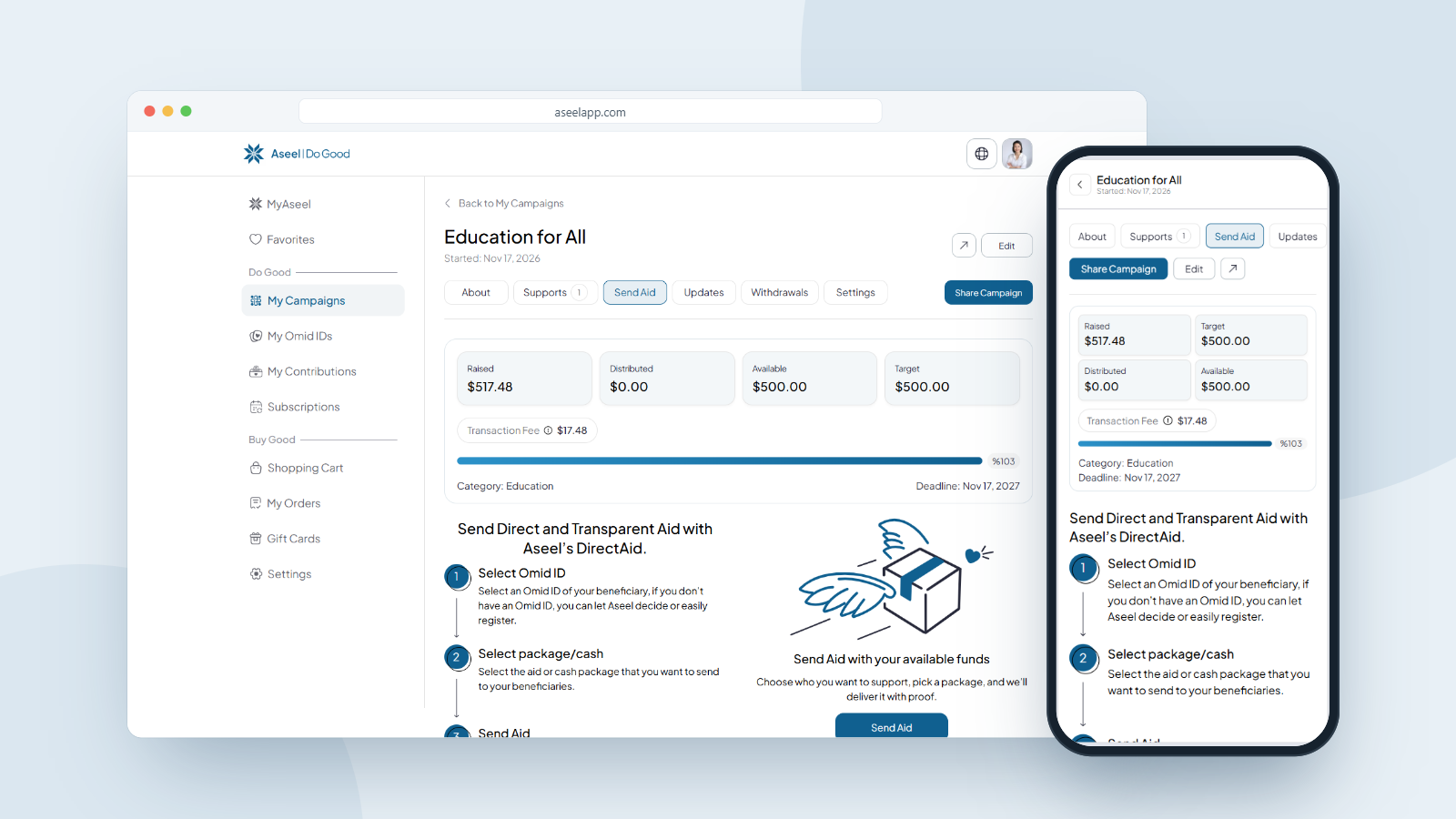
As an organizer, you use your campaign's available funds to send aid directly to families in need. Open your campaign, go to the Send Aid tab, then click Send Aid. Choose who you're helping (let Aseel decide, or pick one or more people you know by their Omid ID), add the aid packages or cash you want to send, choose how you'd like your proof of delivery (message, photo or video), review the summary, and click Send Aid. Aseel delivers to the verified family and sends you proof when it arrives. Two fees can apply, a 5% service fee on cash packages and a flat $7 Atalan delivery fee, both shown in your order summary, and you can track everything by order number afterwards.
What "Send Aid" Means
Sending aid is how your raised funds become real help for a family. Instead of withdrawing the money, you use your available campaign funds to send aid packages or cash directly to verified people in need. Aseel handles the delivery through its local network, and you receive proof of delivery when it arrives.
This is the heart of what makes Aseel different. Every delivery goes to a verified recipient and comes back with proof, so your donors can see exactly where their support went.
What is OMID ID?
When you send aid to someone you know, you send it to their Omid ID. An Omid ID is a secure, scannable ID given to families or individuals in need. It connects them to their personal Wishlist, so anyone around the world can send them aid with confidence.
• Unique: each ID is linked to a specific person or household.
• Transparent: donors see the recipient's needs in real time.
• Trackable: you receive proof of delivery when your aid arrives.
If the person you want to help doesn't have an Omid ID yet, you can register one during the Send Aid flow, then send their package. If you'd rather Aseel choose a verified family for you, you can do that too.
How to Open the Send Aid Flow
On desktop or laptop:
1. Sign in and open My Campaigns from the left sidebar.
2. Click your campaign to open it.
3. In the row of tabs across the top (About, Supports, Send Aid, Updates, Withdrawals, Settings), click Send Aid.
4. The Send Aid tab explains the three steps. Click the Send Aid button to begin.
On mobile:
1. Sign in, tap Profile in the bottom bar, then tap My Campaigns.
2. Tap your campaign to open it.
3. Open the tabs row and tap Send Aid, then tap the Send Aid button.
Before you begin, your campaign shows your Available funds at the top. You can only send aid within that available amount.
Step 1: Choose Who You're Sending Aid To
The first screen asks "Who are you sending aid to?" You have two options, shown as a toggle at the top.
Option A: Let Aseel Decide
Choose Let Aseel Decide if you want Aseel to deliver your aid to the most urgent, verified Omid ID cases in need. This is the simplest path when you don't have a specific person in mind. The screen confirms: "By choosing this option, you allow Aseel to deliver aid to the most urgent and verified Omid ID cases in need." Select it and click Next, and you'll go straight to choosing your packages or cash (there's no need to pick a specific Omid ID, since Aseel assigns a verified case for you).
Option B: Someone I Know
Choose Someone I know to send aid to a specific person or household.
• If they already have an Omid ID: find them under Your Omid IDs, or use the Search box. Click their card to select it. You'll see them appear under Selected Omid IDs on the right. You can select more than one.
• If they don't have an Omid ID yet: click Register Omid ID, create the ID for the person or household, and then select it.
When you've selected everyone you want to help, click Next.
Tip: You can send aid to multiple Omid IDs in a single flow, so you can help several families at once.
Step 2: Select the Aid Packages or Cash to Send
Now you choose what to send to each beneficiary. Under each selected person, click Add Package. A Select Packages window opens with two kinds of aid:
• Cash package: enter an amount and choose the currency. The minimum cash amount is $10.
• Aid packages: choose from the list of ready-made packages, each with its price.
Select what you want to send and click Add. You can adjust the quantity of a package, add more than one package, and repeat this for each beneficiary. Choose only the packages that fit within your available funds and match the needs of the person you're supporting.
Tip: You can mix and match, sending both cash and aid packages, across multiple beneficiaries in the same order.
Step 3: Choose Your Proof of Delivery
Next, under Select Your Preferred Proof of Delivery, choose how you'd like to receive confirmation when your aid arrives:
• Message
• Photo
• Video
Step 4: Review the Summary and Send
On the right side of the screen, the Summary shows everything before you confirm:
• Total Beneficiaries
• Each package and its quantity, with the price
• Fees (a 5% service fee on cash packages, plus the $7 Atalan delivery fee, which does not go to Aseel)
• Total
Check that everything is correct, then click Send Aid. By clicking Send Aid, you agree to Aseel's Terms of Use and Privacy Policy.
Step 5: Done, Now Track Your Aid
Once your aid is sent, you'll see a DirectAid Sent confirmation with an order number (for example, #0000007904). From here you can:
• Track Aid: follow your delivery through to completion.
• Send Aid Again: start another delivery right away.
Your sent aid also appears on your campaign under Direct Aid Sent, a history list showing each order's Order No, Quantity, Total, Status and Date. A new order starts as Pending and updates as it moves toward delivery, so you can follow every order through to completion and proof.
Understanding the Fees
Sending aid can carry two fees, both shown in your order's Aid Summary before and after you confirm:
1. Service Fee (5% of cash packages): a 5% fee that applies only to cash packages. Aid packages don't have this fee.
2. Atalan (Delivery) Fee: a flat $7 delivery fee for doorstep delivery by the Atalan network. This fee does not go to Aseel.
For example, on a $40.95 cash package: the Service Fee (5%) is $2.05, the Atalan Delivery Fee is $7.00, for a Total Aid Value of $50.00.
Frequently Asked Questions
How do I send aid from my campaign?
Open your campaign, go to the Send Aid tab, and click Send Aid. Choose who you're helping, add packages or cash, pick your proof of delivery, review the summary, and click Send Aid.
What's the difference between sending aid and withdrawing funds?Send Aid turns your funds into aid packages or cash delivered to verified families, with proof of delivery. Withdraw Funds transfers your raised money to your own payout method. This guide covers sending aid.
What is an Omid ID?
A secure, scannable ID given to a family or individual in need. It links them to their personal Wishlist so you can send aid with confidence, and it's unique, transparent and trackable.
What if the person I want to help doesn't have an Omid ID?
Choose Someone I know, then click Register Omid ID to create one for them, and send their package in the same flow.
Can I send aid to more than one person at once?
Yes. Under Someone I know you can select multiple Omid IDs, and you can add packages or cash for each of them in a single order.
Can I send both cash and a package?
Yes. You can add a cash package (minimum $10) and one or more aid packages, and mix them across beneficiaries in the same order.
Can I change my proof of delivery choice later?
No. Your proof choice (message, photo or video) can't be changed after you send, so choose it before you confirm.
Is there a fee to send aid?
Two fees can apply. A 5% service fee applies to cash packages only, and a flat $7 Atalan (Delivery) Fee covers doorstep delivery and does not go to Aseel. Both are shown in your Aid Summary.
How do I know my aid arrived?
After sending, you get an order number you can track in your Direct Aid Sent history, and you receive your chosen proof of delivery (message, photo or video) once the aid reaches the family.
What are the types of proof of delivery?
There are three: a message, a photo or a video of the aid reaching the family.
Turn Your Campaign Into Real Help
You raised the funds, and sending aid is where they change a life. Choose who you're helping, send a package or cash, and wait for the proof to come back. Every delivery is a verified family helped, and a story you can share with the donors who made it possible.
About Aseel
Aseel is a tech-driven startup providing a digital marketplace where artisans can sell their one-of-a-kind handcrafted products while supporting humanitarian efforts worldwide. We champion using practical skills to create the positive impact businesses and communities deserve. Aseel's intuitive platform empowers thousands of makers by connecting them with a global audience. Transparency and privacy are at the heart of everything we do. Our dedicated customer service team is available anytime to assist clients through our secure and protected platform.
Follow Aseel on Google
Add Aseel as a preferred source on Google to see more of our stories in your Search results.